

The new suite of MAGIX music production tools come not only with new names but also with a free fully-functional app – Music Maker. With hundreds of loops, sounds, and effects for you to choose from; an easy-to-move-around interface with a clean and intuitive arrangement, and a sufficient choice of production and editing tools, Music Maker will allow you to create and share your own songs and compositions in minutes.
Designed and marketed as the starting point for music both amateur and professional composers, this now free version of the program combines useful sounds and loops with the possibility of recording live instruments to help you unleash your creativity in the most intuitive way. Superior paid versions of the program – Plus, Live, and Premium editions – add thousands of other sounds and loops, a larger soundpool library, more software instruments, and a plethora of production and mixing tools to provide you with even more creative possibilities. However, you don’t need to part from your precious dollars anymore to enjoy the core functionality shared by all versions of Music Maker.
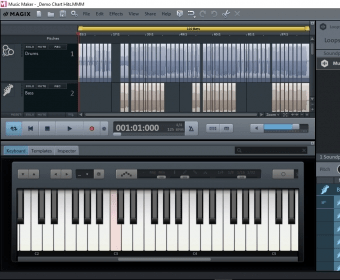
Equipped with a realistic graphic piano keyboard, you can start drafting your own compositions right away. You can select any of the FX profiles provided to add a cathedral, distortion, concrete wall, or even a bathroom effect to your music, among other possibilities. You can then combine your own sounds with the extensive choice of instruments and sounds available and arrange them as you wish until they match what you had in mind. Actually, the extensive list of loops and sounds provided by this app will let you create new tracks without tapping a key – just by dragging and dropping the desired loops from the library and play around with their pitch and the various audio effects. However, the program comes with three software instruments to help you with your compositions – Revolta 2, a virtual synthesizer; Concert Grand LE, your own concert grand piano, and Vita 2, a sample player with a wide range of instruments, samples, and filters. To top it all off, Vandal SE will amplify and distort the sound of your guitar recordings just as you used to do with your old guitar amplifier. If you still miss the possibility of adding your own instruments to the mix, Music Maker lets you plug them in so that you can make your own live recordings.
Though I missed some tools to clean up artifacts and other unwanted sounds from old recordings, or to remove vocals to create instrumental bases for further processing, Music Maker comes with enough editing tools to improve and enhance your creations. You will find a processor, a 10-band graphic equalizer, a frequency tuner, a channel mixer, or a feature to preview any audio effects, to name but a few of them.
To make things easier for those with little experience in audio creation software, MAGIX offers you a number of video tutorials that will help you reduce the program’s already short learning curve and to learn some tricks on the way. The interface has been designed to be as comprehensive as possible without looking too cluttered, with tabs and menus that will help you discover its many options intuitively. Do not get fooled by the fact that this fully-functional and full-featured music creation tool is now free of cost – it is perfectly suitable for both amateur and professional music lovers and composers in need of a customizable and flexible creation tool with professional output quality.






Comments (2)
PROS: The tool is programmed in C++. In protected solution everything works like in original workbook. Average user cannot see formulas in cells and vba code in protected workbook. Protects xla files. Lots of features.
CONS: The product uses unmodified, original workbooks in protected solutions and relies on hackers’ methods to take customer away from seeing the content of the workbook (Hooks Excel windows and blocks Excel’s COM objects methods calls). The tool is trying to stub all Excel’s security breaches, which is impossible with an unmodified, original workbook.
When a protected solution has been started on an end customer computer, the spreadsheet becomes as unprotected as newborn baby.
5 lines of C code extract the original workbook from the protected solution, doesn’t matter whether it’s xls or exe file.
To prove the vulnerability of LockXLS solutions, just e-mail a protected solution to WhiteHatXL at yahoo dot com , the original workbook will be returned.
SUMMARY: Fake. This product is not for a workbook protection.
The full review you may find here http://sites.google.com/site/whitehatxl/
or here as an image http://i.imgur.com/8JJeQ.png